

Office WiFi problems show up as dropped video calls, frozen cloud apps, and dead zones that stall work the moment staff move away from the router.
Enterprise WiFi solves these problems with dedicated access points, centralised network management, and traffic prioritisation built for daily business use.
This breakdown is built for Malaysian business owners and office managers who are tired of patching a network that was never designed for commercial demand.
What Is Enterprise WiFi?

Enterprise WiFi is a professionally designed wireless network built for offices, retail spaces, warehouses, schools, and commercial buildings that need stable, secure, and high-capacity internet access.
A proper enterprise WiFi setup uses commercial-grade access points, centralised control, secure user segmentation, and planned coverage to keep staff, guests, POS systems, CCTV, access control, and smart devices connected smoothly.
As Malaysian businesses grow more than 20 to 30 connected devices, a residential router often starts causing weak coverage, dropped connections, and productivity delays.
Elite ELV designs enterprise WiFi systems around your floor layout, user count, device usage, and future expansion needs, helping your network support daily operations instead of slowing them down.
Contact Elite ELV for a free network assessment so we can provide recommendations for office connectivity.
4 Office WiFi Problems That Show Your Business Needs an Upgrade
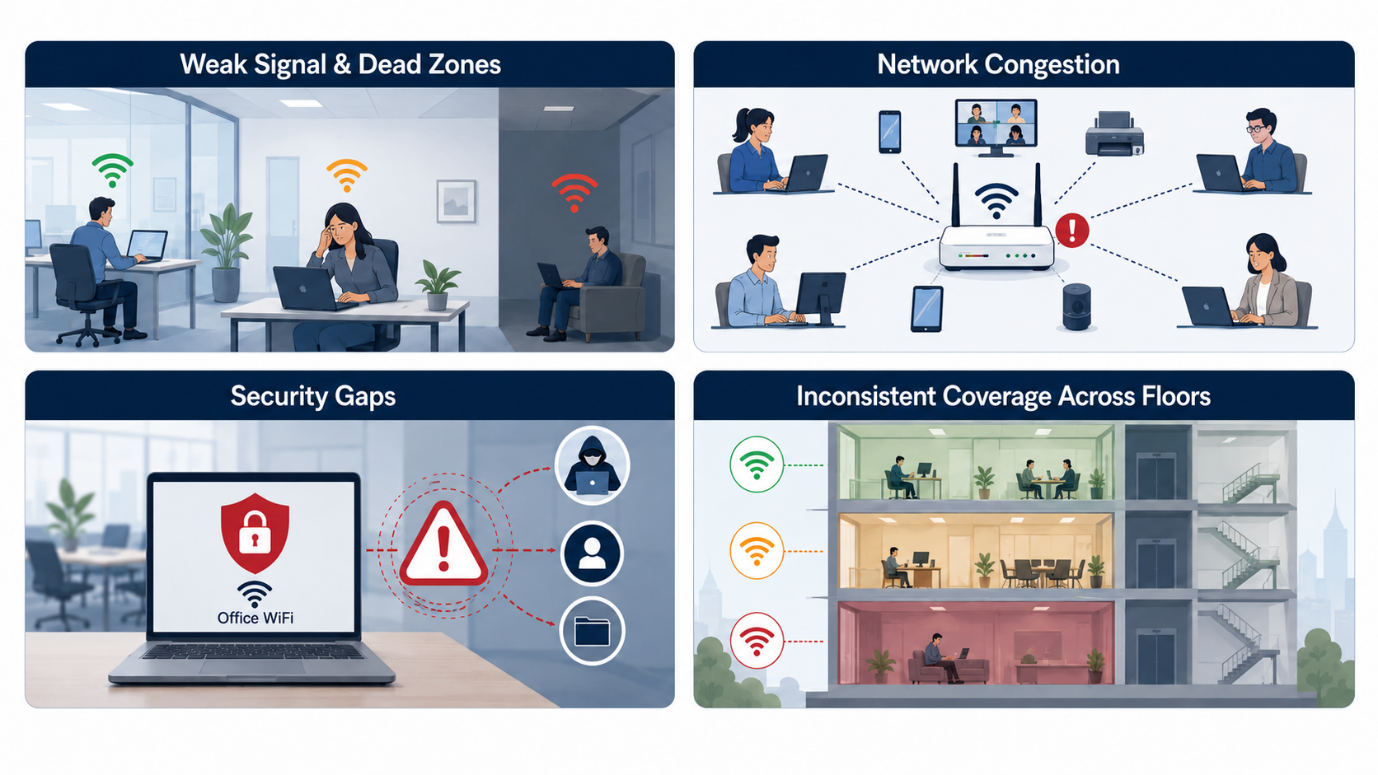
Image is AI-generated
Slow speeds, weak coverage, dropped connections, and overloaded routers are common signs of a WiFi system that has outgrown the workplace.
1. Weak Signal and Dead Zones
Concrete walls, server rooms, and open-plan partitions block signal from a single router. Meeting rooms at the far end of an office often sit in a dead zone, forcing staff to relocate calls mid-conversation.
2. Network Congestion During Peak Hours
A single router struggles once video conferencing, cloud storage syncing, and VoIP calls run at the same time. Bandwidth contention during the 9am to 11am peak is one of the most common complaints logged by Malaysian SMEs.
3. Security Gaps from Unsegmented Networks
Guests, contractors, and staff devices sharing one network create exposure. A compromised personal device on the same network as finance systems puts sensitive company data at risk.
4. Inconsistent Coverage Across Floors
Multi-floor offices and shoplots often rely on WiFi extenders that introduce latency and frequent disconnections. Each hop between extenders adds delay, which is why video calls stutter on certain floors but not others.
When these issues affect staff productivity, meetings, POS systems, or connected devices, it may be time to move from a basic router setup to a properly planned enterprise WiFi solution.
How Benefits of Enterprise WiFi Solves These Problems
Enterprise WiFi replaces single-point coverage with a mesh of access points managed from one controller, giving every corner of the office the same signal strength and the same security policy.
Factor | Consumer Router | Enterprise WiFi |
|---|---|---|
Device capacity | 20-30 devices before lag | Hundreds of devices per access point |
Coverage | Single point, dead zones common | Mesh access points, full-floor coverage |
Security | One shared network | Segmented VLANs for staff, guests, devices |
Management | Manual, per-device setup | Centralised dashboard, remote monitoring |
Book a free office network assessment with Elite ELV and see the difference of how enterprise WiFi makes.
Fix Office WiFi Problems with a Proper Enterprise Network Setup

Image is AI-generated
Elite ELV contractor in Malaysia fixes these issues by designing a complete enterprise WiFi with Ubiquiti in Malaysia and network infrastructure setup for offices, shoplots, commercial buildings, and residential properties.
The team maps coverage floor by floor, plans the right access point locations, installs commercial-grade equipment, and configures the network based on your headcount, workspace layout, and connected devices.
Staff, guest, CCTV, access control, and smart device traffic can also be separated through centralised network control, helping reduce congestion while improving security. This gives your business a more stable, scalable, and secure WiFi system without relying on repeated patch fixes.
We also integrate the WiFi upgrade into your wider ELV infrastructure, so your network supports daily operations, security systems, energy efficiency, and future digital expansion from one planned solution.
Find out more about what is an ELV contractor that assists in assessing the site before implementing the enterprise WiFi network setup.
Enterprise WiFi Setup for a Multi-Floor Office in Kuala Lumpur

Image is AI-generated
The office was experiencing inconsistent WiFi coverage across different floors, with weak signal areas affecting meeting rooms, work zones, and shared office spaces.
As more staff relied on laptops, mobile devices, and connected office systems, the existing setup could no longer support stable day-to-day connectivity.
Elite ELV reviewed the office layout, floor structure, user density, and weak signal areas before planning a business-ready WiFi setup.
- Planned access point placement based on floor usage, workstation density, and signal coverage needs.
- Installed proper network cabling to support stable access point performance.
- Configured the wireless network to reduce interference between floors.
- Tested WiFi coverage across meeting rooms, workstations, and shared spaces before handover.
- Recommended suitable Ubiquiti Malaysia devices to support stronger coverage, scalable performance, and long-term office connectivity.
The completed upgrade gave the client a more reliable wireless network across its multi-floor office.
- Stronger WiFi coverage across workstations, meeting rooms, and common areas.
- Fewer weak signal zones affecting staff productivity.
- More stable connectivity for laptops, mobile devices, and office systems.
- A cleaner access point layout designed around actual office usage.
- A scalable network foundation that can support future business growth.
This project shows how proper WiFi coverage planning, access point placement, and cabling support can help commercial offices reduce dead zones, improve network stability, and create a more reliable working environment.
Upgrade Your Office WiFi Before It Disrupts Daily Operations
Slow office WiFi can affect meetings, file sharing, staff productivity, customer service, and connected systems across your workplace. When the same connection issues keep returning, your business needs more than another temporary router or extender.
Elite ELV moves from unstable WiFi setups to properly planned enterprise networks that support smoother daily operations and future growth. A professionally designed wireless setup gives your office a more secure, stable, and scalable network foundation.
Book a free office network assessment with Elite ELV today and find out how your workplace WiFi can be improved.


